

How To Create A Blurb
If you're willing to make a blurb, to share what you like about Life of Fiction, that's awesome,...but here's how to do it for ANYONE you like...


Paid subscribers can comment, access the archive of this site, along with other stories, art, and any article I’ve ever written. If you aren’t a paid subscriber, you can access the archive for free with a 7-day trial OR earn a paid membership by joining the referral program!
This community is special because of YOU. We don’t do social media. We don’t throw money at Google / Facebook / Amazon for advertising. We don’t pound on our chests or use link-bait.
We’re just…us. Thank you for loving us. The feeling is mutual.
Special Thanks to WordiGirl and Kummer Wolfe for providing blurbs to help spread the word!
Have you wanted to create a blurb?
Do you know what they are? You must have noticed them on the Welcome pages of the Substacks you’ve visited…
Those little personal recommendations you leave for a creation are gold. The owner of the Substack publication can then post your kind words on their Welcome page, where everyone arrives the first time.
Did you know a substack WITH blurbs gain far more subscriptions than those without a blurb? Yuppers. I can’t find the article I was reading, but if I remember correctly, it was by 30%. That’s huge.
So if you DO like a substack, especially this one, ‘recommend’ them.
Publications can place up to three recommendations as blurbs on their own welcome page. Sad part is, the process isn’t as simple or easy to find/follow as it should be. That’s where I come in. I’m going to show you right now.
Ready to say something sweet and intriguing for Life of Fiction?
Let me show you where to write it.
How To Make A Blurb
STEP 1: Go to YOUR substack and click “Dashboard” in the upper right corner, where your Avatar is.

STEP 2: Click ‘Recommendations’ in the menubar.
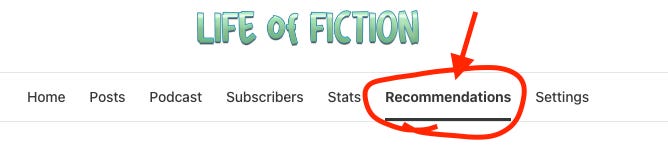
STEP 3: From Recommendations, click the “Manage” button.

STEP 4: From Manage Recommendations, click the “Add recommendation” button at the bottom right.

STEP 5: A section will pop up for you search for the publication you want to recommend. Fill in “Life of Fiction” or whatever publication you are recommending, fill it out, and hit “Add recommendation” and it’ll save.
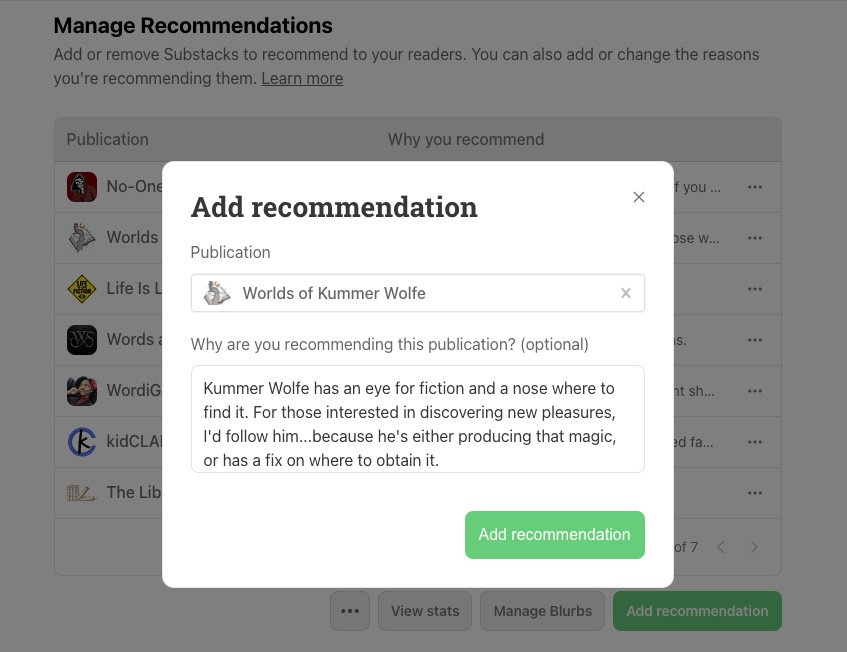
That’s it!
You’ve now made a recommendation about a publication, and the owner of that publication will immediately have access to your kind words, and can choose it as one of three that can be displayed on their Welcome page.
Well done.
Have any questions with this process? Just ask.
Hit the ‘Leave a Comment’ button and join the conversation, cause I’m waiting!


Want to help keep me in basic office supplies?
I’m always running out of basic supplies……if you’re willing & able, you can click on my list of what I use and buy a product …..OR…. you can buy me a coffee and I’ll get what I need when I need it. THANKS!
Lol glad you got it sorted! this tutorial will help people indeed.
PFT. To do it properly I had to finish my profile and create a substack. So now I can start collecting followers. Hm. What will I do next?